Stopline Trade Manager EZ Get EZ · $30

Stopline Trade Manager EZ: trade panel and lot size calculator for MT5 and MT4

Your entry. Your exit. Your way.

A compact trade panel for MetaTrader 5 and 4. Plan the trade with lines on the chart, get the lot size from your risk, send any order type, and manage every position with one press: close, close a percentage, breakeven.

$30, one payment, on 10 computers. Sold on the MQL5 Market. Read the manual first.
The EZ window on a EURUSD chart: lot 1.96 for a risk of 1 percent, a stop 25 pips away, a target at twice the risk, and the planning lines with their figures.
The EZ window on a EURUSD chart: the lot, the risk in money and the reward-to-risk ratio sit above Buy and Sell, and the entry, stop and target lines carry the same figures.

No signals: every entry starts with you. Sold on the MQL5 Market.

Stopline Trade Manager adds partial closes, a trailing stop and breakeven that run by rules you set, from $49.

See Stopline Trade Manager

Placing a trade

Drop it on a chart and allow Algo Trading. The entry, stop and target lines appear, already spread so you can grab them, with the lot, the risk and the reward on their labels.

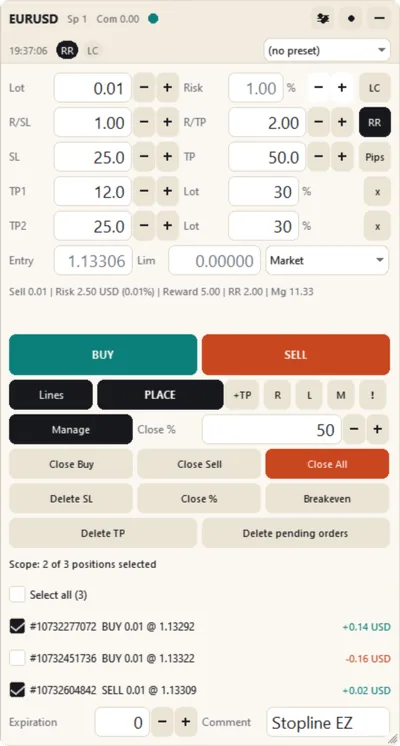
The Stopline Trade Manager EZ window: lot and risk, the reward-to-risk ratio, stop loss and take profit, the order type, Buy and Sell, and the pending-order buttons.
Place the lines Type your risk as an amount or a percentage and move the stop line: the lot, the money at risk and the reward-to-risk ratio update as you drag. Drag the entry away from the price and the order becomes a stop or limit order.
The confirmation before a buy: direction, lot 1.96, entry, stop and target with their distances, risk 490 USD (1 percent), reward 980 USD, margin and spread.
Confirm Press Buy or Sell and check the lot, entry, stop, target, risk, reward and margin: Enter sends it, Esc cancels. Or switch to one-click trading.

Manage every position with one press

  • Close the buys, the sells or everything, or close a percentage: type it, or press 1 to 9 for 10 to 90 %.
  • Breakeven now, remove the stop loss or the take profit, delete the pending orders.
  • Tick the positions the buttons act on, or act on every position of the symbol.
  • A label on every position, with its own menu: select, close, close 50 %, breakeven now, remove the stop or the target.
  • Up to five take-profit levels per trade, each closing its own share of the lot.
  • Price alert lines with a pop-up, a sound, a push notification or an e-mail.
  • Only the panel's own trades: positions of other Expert Advisors are left alone.
The menu of a position label in EZ: select it for the Manage buttons, close, close 50 percent, breakeven now, remove the stop loss, remove the take profit.
The menu of a position's label on the chart.
The EZ window in Manage mode: Close Buy, Close Sell, Close All, Delete SL, Close %, Breakeven, Delete TP and Delete pending orders, with a tick row for each open position.
EZ in Manage mode: the close buttons, breakeven, and a tick row for each position.

Risk guards for prop-firm and personal accounts

Set once in the input dialog, they hold you to your own limits.

GuardWhat it does
Daily loss limitBlocks new entries for the rest of the day once the loss reaches your limit, in percent or money.
Maximum open tradesRefuses a new entry above your limit.
Exposure per symbolRefuses an order that would take the symbol's lots above your limit.
Spread limitHolds entries while the spread is wider than your limit.
Lot limitKeeps the lot inside your minimum and maximum and says when it applies.
Free margin checkRefuses an order the free margin cannot carry, before the broker does.
Health dotShows when Algo Trading is off, the connection is lost or the daily limit is reached.

On a prop-firm account, check first that your firm allows Expert Advisors.

Prop-firm daily loss limit: the guide

Your look, your language, your keys

The top of the EZ window in the four themes: Dark, Light, Slate and Midnight.
Four themes, Dark, Light, Slate and Midnight, plus high contrast; nine languages; four panel sizes from 75 to 150 %; your own hotkeys; presets, and settings saved per symbol.

What EZ does not do

  • It gives no signals, predicts nothing and opens no trade by itself.
  • It does not run the exit by rules: no trailing stop, no automatic breakeven or partial close, no hidden stops, virtual orders, OCO or time manager, no statistics or journal. Stopline Trade Manager has them.
  • Take-profit levels, and stop-limit orders on MT4, are kept by the Expert Advisor: they work while the terminal is running and connected.
  • Push and e-mail alerts use the terminal's own notification settings.

Read the EZ manual before you pay

Guides

Who is behind it

Stopline Trade Manager EZ is made by BSM Equity Pty Ltd, Australia. Questions before or after you buy: the product's Comments tab or a private message on MQL5. We answer within 24 hours.

Price

Stopline Trade Manager EZ MT5 and MT4

$30USD, one payment

  • Free updates through the MQL5 Market
  • Use it on 10 computers, with any broker and account

See it on the MQL5 Market: MT5 · MT4

Two separate products, one per terminal, and separate from Stopline Trade Manager. Payment, licence and activations are handled by the MQL5 Market.

The MQL5 Market does not refund purchases, so read the manual first. More on refunds

EZ questions

Is there a free version or a trial?

No. EZ is sold only as a purchase, $30 once. The free demo on the MQL5 Market runs only in the Strategy Tester, where MetaTrader passes no mouse clicks to an Expert Advisor, so you can look at the panel there but not use it. The manual shows every control and input before you pay.

How do I buy and install it?

The buttons open the purchase on the MQL5 Market, where you pay with an MQL5 account. Then, in MetaTrader, open the Market tab of the Toolbox (MT5) or of the Terminal window (MT4), select Purchased and press Install. Each purchase works on 10 computers, with any broker and account, and updates are free.

Can I get a refund?

The MQL5 Market does not refund purchases, so read the manual first. If something does not work as described, write in the product's Comments: the MQL5 rules let you ask for a fix within a month of purchase, and we answer within 24 hours.

Can it trade in one click?

Yes. A confirmation with every figure comes before each order by default; turn on one-click trading and orders are sent on the first press. Closing can ask for a confirmation as well, or not.

MT5 or MT4: which do I need?

The one for the terminal you trade in. Each edition is two products, one for MetaTrader 5 and one for MetaTrader 4, with the same panel and manual; a purchase of one does not include the other. The few differences come from MetaTrader 4 itself and are listed in each manual.

Can I use it on a prop-firm account?

It is a manual trading tool, but the rules are the firm's: check that it allows Expert Advisors first. The daily loss limit blocks new entries for the rest of the day once your loss reaches your limit; maximum open trades and exposure per symbol stop you from overtrading or doubling up on one symbol.

Which brokers and symbols does it work with?

Any MetaTrader broker and any symbol it offers: forex, metals such as XAUUSD, indices, stock CFDs and crypto CFDs. The lot uses the tick value your account actually books, and the panel tells you when the broker's published figure is different.

Can I move from EZ to Stopline Trade Manager later?

Yes. They are separate products, so an EZ purchase is not converted or credited. Attach Stopline Trade Manager and set its magic number input to 20260929: it then manages the positions that EZ opened. Their take-profit levels stay with EZ, so set new ones in Stopline Trade Manager if you want them.

Can I run EZ and Stopline Trade Manager in one terminal?

Yes, on different charts. Each has its own magic number and its own data folder, so with their default inputs neither touches the other's trades, settings or chart objects.

The hotkeys do nothing. Why?

Usually an input box on the panel has the keyboard: click once on an empty part of the chart. MetaTrader never passes Alt combinations to an Expert Advisor, so use Shift or Ctrl+Shift.

Your entry. Your exit. Your way.

Stopline Trade Manager EZ: $30, one payment, on 10 computers.