Questions before you buy
Which edition do I need?

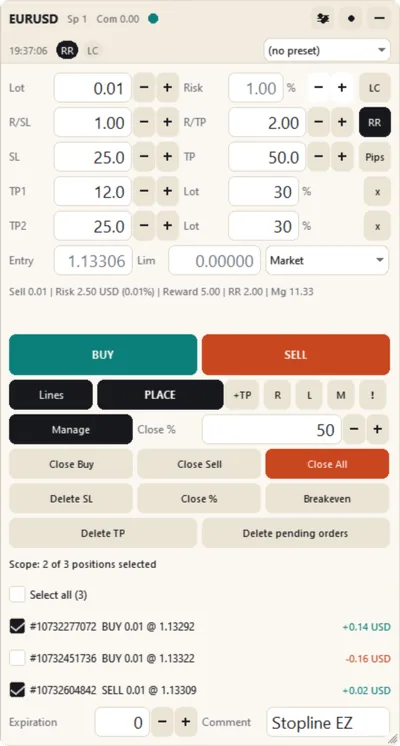
Both size and place a trade the same way: the lot from your risk and the stop line, every order type, up to five take-profit levels and a confirmation before every order. Take EZ if you close your trades yourself and want one compact window. Take Stopline Trade Manager if you want partial closes, a trailing stop and breakeven to run by rules you set, or need virtual orders, hidden stops, OCO or statistics.
How do I buy and install it?
The buttons open the purchase on the MQL5 Market, where you pay with an MQL5 account. Then, in MetaTrader, open the Market tab of the Toolbox (MT5) or of the Terminal window (MT4), select Purchased and press Install. Each purchase works on 10 computers, with any broker and account, and updates are free.
Can I try it before I pay?
Stopline Trade Manager: rent it for 1 month for $30 and use it on your own live or demo charts. EZ is sold only as a purchase; its manual shows every control. The free demo on the MQL5 Market runs only in the Strategy Tester, where MetaTrader passes no mouse clicks to an Expert Advisor, so you can look at the panel there but not use it.
Can I get a refund?
The MQL5 Market does not refund purchases, so read the manual first, and rent Stopline Trade Manager if you want to try it on your charts. If something does not work as described, write in the product's Comments: the MQL5 rules let you ask for a fix within a month of purchase, and we answer within 24 hours.
MT5 or MT4: which do I need?
The one for the terminal you trade in. Each edition is two products, one for MetaTrader 5 and one for MetaTrader 4, with the same panel and manual; a purchase of one does not include the other. The few differences come from MetaTrader 4 itself and are listed in each manual.
Can I move from EZ to Stopline Trade Manager later?
Yes. They are separate products, so an EZ purchase is not converted or credited. Attach Stopline Trade Manager and set its magic number input to 20260929: it then manages the positions that EZ opened. Their take-profit levels stay with EZ, so set new ones in Stopline Trade Manager if you want them.
Can I run EZ and Stopline Trade Manager in one terminal?
Yes, on different charts. Each has its own magic number and its own data folder, so with their default inputs neither touches the other's trades, settings or chart objects.
Does it open trades by itself?
No. Neither edition gives signals; every entry starts with you. The one exception is a scheduled open you set up in Stopline Trade Manager's trade time manager. In a Strategy Tester run without visualization each makes one small test trade, which the MQL5 Market's automatic check requires.
Which brokers and symbols does it work with?
Any MetaTrader broker and any symbol it offers: forex, metals such as XAUUSD, indices, stock CFDs and crypto CFDs. The lot uses the tick value your account actually books, and the panel tells you when the broker's published figure is different.
Your entry. Your exit. Your way.
EZ $30, one payment. Stopline Trade Manager $49 launch price, then $99, one payment.
Stopline Trade Manager EZ
Stopline Trade Manager